

Best Massage Therapy Software 2026: Honest Comparison
Best Massage Therapy Software of 2026: An Honest Comparison
Choosing the best massage therapy software in 2026 is harder than it looks. Every platform claims to do everything. Most feature pages look nearly identical. And after you sign up, you discover the things that actually matter — like whether clients can book without creating an account, or whether SOAP notes are included in the base plan — are buried in fine print or simply missing.
This guide cuts through the noise. We’re not going to tell you one platform is universally “the best.” Instead, we’ll walk you through every feature category that matters for a modern massage practice, explain what to look for, and flag the details that most comparison articles overlook.
By the end, you’ll have a clear framework for evaluating any massage therapy software — and you’ll know exactly which questions to ask before you commit.
Table of Contents
- Why Software Choice Matters More Than Ever
- Online Booking: The Feature That Makes or Breaks Client Experience
- Appointment Reminders: SMS vs. Email
- SOAP Notes & Clinical Documentation
- Digital Intake Forms & Paperless Onboarding
- Invoicing & Billing
- Analytics & Financial Reporting
- HIPAA Compliance: What You Actually Need
- Pricing: What to Expect at Each Tier
- The 2026 Software Evaluation Checklist
- Frequently Asked Questions
Why Software Choice Matters More Than Ever in 2026
A few years ago, massage therapy software was mostly about replacing a paper appointment book. Today, it’s the operational backbone of your entire practice. Your software handles how clients find you, how they book, whether they show up, how you document their treatment, how you bill them, and how you understand your business performance.
The stakes are higher because client expectations have risen sharply. Clients now expect to book a massage appointment the same way they book a restaurant — instantly, from their phone, without creating yet another account. If your booking process requires a login or app download, a meaningful percentage of potential clients simply won’t complete it.
Furthermore, regulatory requirements haven’t gotten simpler. HIPAA still applies to any practice collecting client health information. Data security standards continue to tighten. And as practices grow, the administrative burden of managing multiple therapists across multiple locations without the right software becomes genuinely unworkable.
The right software pays for itself. The wrong one quietly costs you clients, time, and compliance exposure every single month.
Online Booking: The Feature That Makes or Breaks Client Experience
Online booking is table stakes in 2026. Every serious massage therapy platform offers it. However, not all booking systems are created equal — and the differences that matter most are the ones clients encounter directly.
The Account Creation Problem
Here’s something most software comparison articles won’t tell you: a significant portion of massage therapy platforms require clients to create an account before they can book. This seems minor. In practice, it’s a major drop-off point. Research across multiple industries consistently shows that any additional step in a checkout or booking flow reduces conversions. For a solo therapist whose livelihood depends on a full schedule, this friction has real financial consequences.
When evaluating booking software, ask this question directly: Can a new client book their first appointment without creating a username and password? The answer should be yes.
What Good Booking Software Looks Like
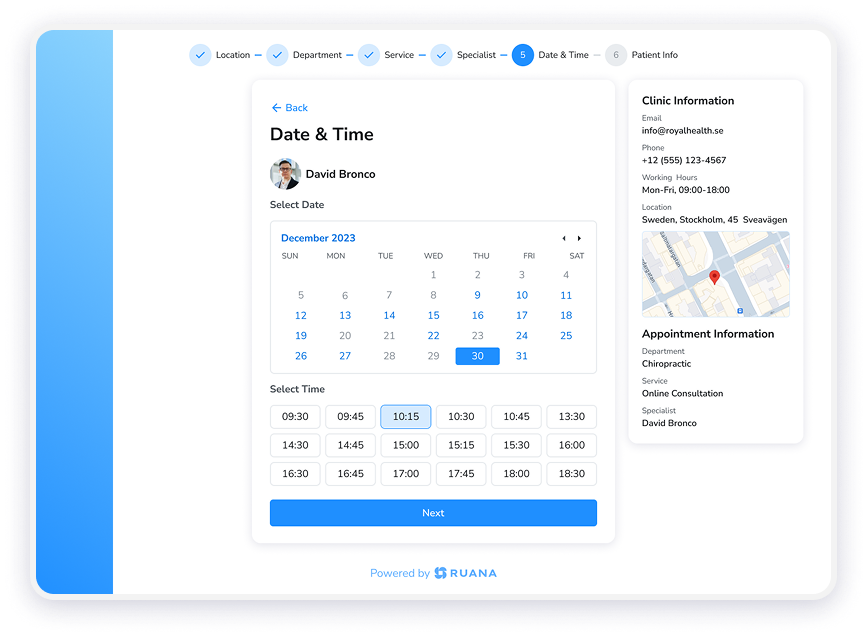
Beyond the account question, evaluate these elements:
- Availability display: Clients should see real-time availability that reflects your actual calendar — no double-bookings, no manual updates required.
- Service selection: Clients should be able to choose their service type, preferred therapist, and time in a single clean flow.
- Appointment requests vs. auto-confirm: Some practices prefer to approve appointments before they’re confirmed. Look for software that supports both modes.
- Booking link portability: Your booking link should be embeddable on your website, shareable on social media, and includable in your email signature.
- 24/7 availability: Your booking page should work at 2am on a Sunday. Many clients book outside business hours.
Pro tip: Add your booking link to your Google Business Profile. This alone can significantly increase new client conversions for local search traffic.
Appointment Reminders: SMS vs. Email
No-shows are one of the most significant revenue drains in any massage practice. Industry data consistently shows that automated reminders — particularly SMS — are the single most effective tool for reducing them.
However, there’s an important distinction to understand when comparing platforms.
Email Reminders
Email reminders are standard on almost every platform. They’re free to send and reliable. That said, email open rates for appointment reminders hover around 20–30%. Many clients have busy inboxes and genuinely miss appointment confirmation emails.
When evaluating email reminders, check whether they’re automatic (sent without staff intervention), what information they include, and whether clients can confirm or cancel directly from the email.
SMS Reminders
SMS reminders are the more powerful tool. Open rates for SMS messages run at approximately 98%, and most are read within minutes of receipt. For a massage practice trying to reduce no-shows, SMS reminders are not optional — they’re essential.
Not all platforms include SMS as standard. Many offer it as a paid add-on or at higher plan tiers. Budget accordingly.
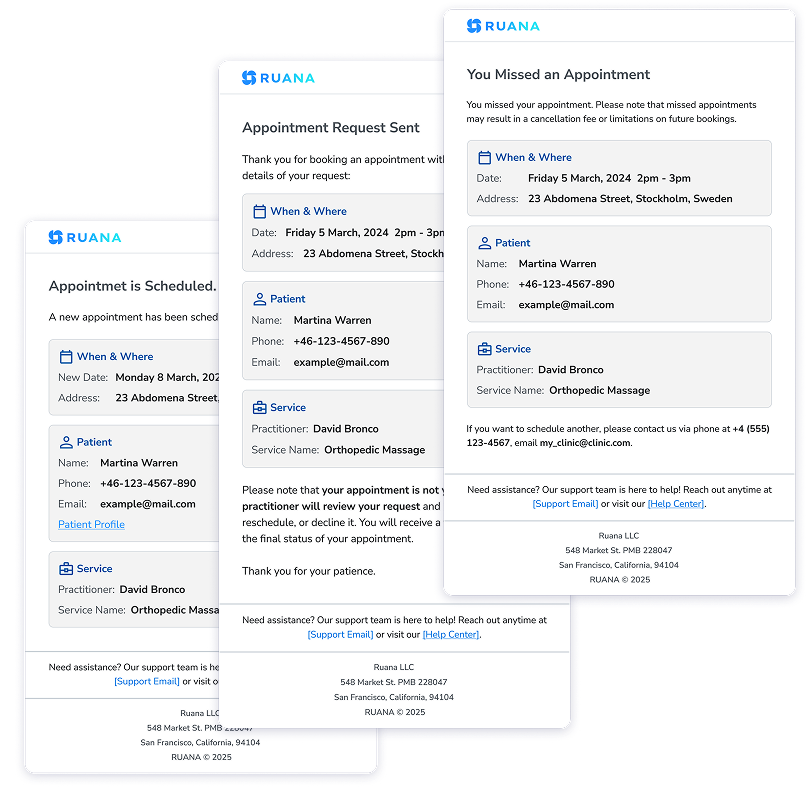
Watch out: Some platforms advertise “automated reminders” but limit customization or only send reminders at fixed intervals. Check whether timing and content match your practice’s actual needs.
SOAP Notes & Clinical Documentation
SOAP notes (Subjective, Objective, Assessment, Plan) are the clinical documentation standard for massage therapy. They’re not just good practice — in many states, they’re required for professional liability coverage and insurance purposes.
Massage therapy software handles SOAP notes in very different ways. Here’s what to look for:
Basic vs. Advanced SOAP Notes
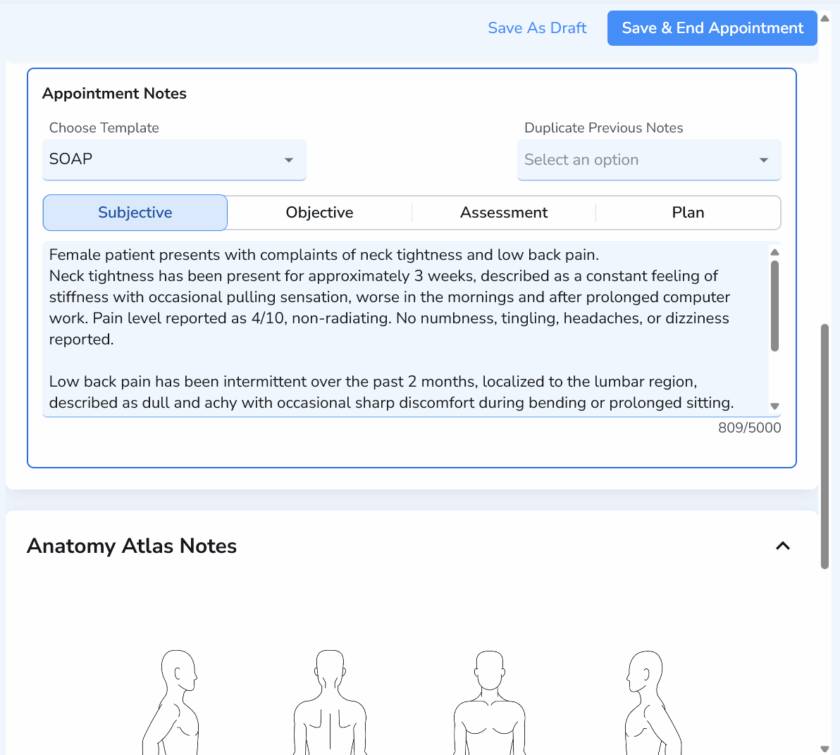
Some platforms include only a basic SOAP note template — a simple text entry form. Others offer structured templates with body diagrams, treatment history, and links between session notes. Advanced platforms offer automatic note generation as a starting point, which the therapist then reviews and finalizes.
For most solo massage therapists, basic SOAP notes are sufficient. For practices focused on therapeutic or clinical massage, advanced structured notes with treatment plan integration are worth the additional cost.
What to Check Before Signing Up
- Are SOAP notes included in the base plan, or are they a premium feature?
- Can you create custom templates for your specific massage modalities?
- Are notes linked to the client’s treatment history and previous sessions?
- Can you upload body diagrams, intake form results, or supporting files?
- Is access to notes controlled appropriately for multi-therapist practices?
Digital Intake Forms & Paperless Onboarding
Paper intake forms are a liability in 2026. They’re inefficient to process, difficult to store securely, and create friction for new clients who have to arrive early to fill them out in your waiting room.
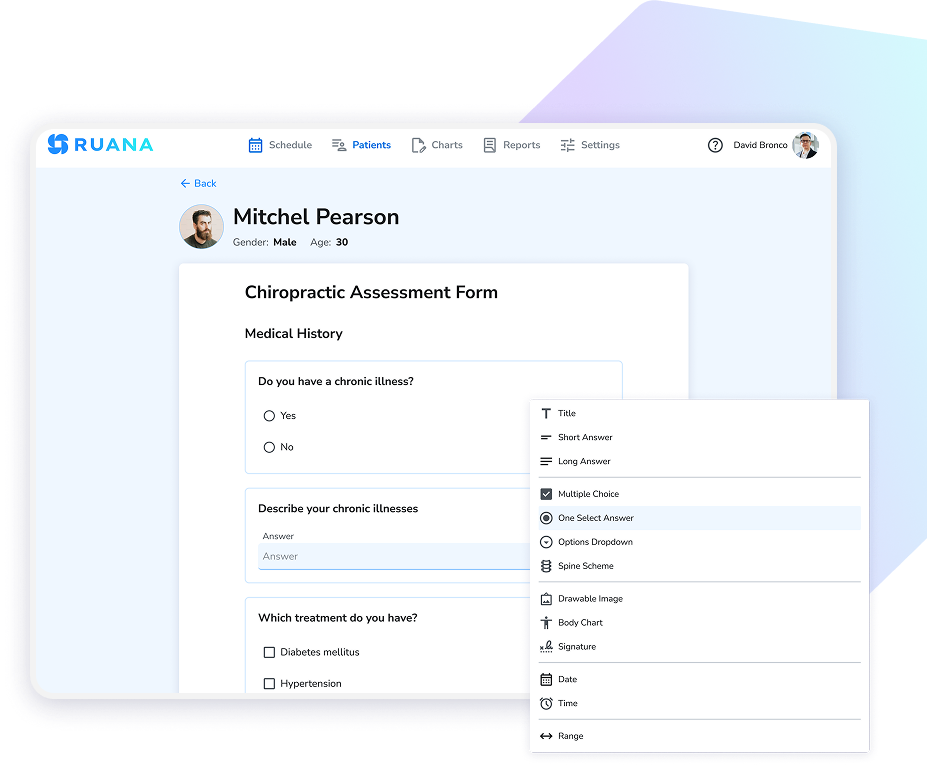
Digital intake forms solve all of this. Clients complete them before their appointment from any device. Your records are immediately organized and linked to the client’s profile. And your practice avoids the HIPAA risks that come with paper records.
When evaluating intake forms, look for:
- Custom form creation: You should be able to build forms specific to your practice — not just use a generic template.
- Pre-appointment delivery: Forms should be sent automatically when an appointment is booked.
- Mobile-friendly completion: Most clients will complete forms on their phone. The form experience needs to work flawlessly on mobile.
- Secure storage: Completed forms should be stored encrypted and linked directly to the client’s file.
Invoicing & Billing
Billing is where many massage therapy platforms either shine or frustrate. It’s worth spending time evaluating this carefully, because the billing workflow you end up with will affect every client interaction.
Most massage therapy software in 2026 includes invoicing. However, the sophistication varies considerably.
What Invoicing Should Cover
- Automatic invoice creation tied to completed appointments
- Professional invoice templates that reflect your practice branding
- Tracking of paid and unpaid invoices
- Revenue tracking by service type, therapist, or time period
- Support for packages and memberships in your billing records
A Note on Payment Processing
It’s important to understand that not all practice management software includes integrated online payment processing. Some platforms handle invoicing and billing record-keeping, while clients pay separately through other means — cash, check, or external payment processors. Evaluate whether a platform’s billing features match your specific payment workflow.
Analytics & Financial Reporting
Most massage therapists didn’t get into this profession to analyze spreadsheets. However, understanding your practice’s financial performance isn’t optional if you want to grow sustainably.
Good massage therapy software should surface this information without requiring you to become a data analyst. Look for dashboards that show:
- Revenue trends over time (weekly, monthly, annual)
- Most booked service types
- Client visit frequency and retention rates
- No-show and cancellation rates
- Revenue by therapist (for multi-practitioner practices)
Additionally, downloadable reports are valuable for tax preparation and financial planning. Look for platforms that let you export data in standard formats.
HIPAA Compliance: What You Actually Need
HIPAA applies to any massage practice that collects, stores, or transmits client health information — which means virtually every licensed massage therapist in the United States. Using software that isn’t designed with HIPAA requirements in mind creates real legal and financial exposure.
When evaluating a platform’s compliance posture, look for:
- Data encryption: Client records should be encrypted both in transit and at rest.
- Access controls: Only authorized staff should be able to access client records.
- Secure hosting: Your data should be hosted on enterprise-grade infrastructure.
- Business Associate Agreement (BAA): Ask whether the vendor will provide a BAA — this is a legal requirement under HIPAA.
Important: Be cautious of any software that makes absolute claims about being “fully HIPAA compliant.” HIPAA compliance is a shared responsibility — your software should be designed to support HIPAA requirements, but your practice policies and procedures are equally part of the equation. The right language is that software is designed to support HIPAA requirements — the rest is your responsibility as a covered entity.
Pricing: What to Expect at Each Tier
Massage therapy software pricing in 2026 typically follows a tiered model. Understanding what each tier actually includes — versus what’s an upsell — helps you budget accurately.
| Feature | Solo / Starter Plans (~$45–50/mo) | Professional Plans (~$65–70/mo) |
|---|---|---|
| 24/7 Online Booking | ✓ Usually included | ✓ Included |
| Email Reminders | ✓ Usually included | ✓ Included |
| SMS Reminders | ✗ Often add-on | ✓ Often included |
| Basic SOAP Notes | ✓ Usually included | ✓ Included |
| Advanced SOAP Notes | ✗ Usually premium | ✓ Included |
| Digital Intake Forms | ✓ Usually included | ✓ Included |
| Financial Reporting | ✓ Basic | ✓ Advanced |
| Multi-Practitioner Support | ✗ Usually not | ✓ + per-seat fee |
| Packages & Memberships | ✗ Often premium | ✓ Included |
Most solo massage therapists will find a starter-tier plan sufficient for daily operations. The move to a professional plan makes sense when you add a second therapist, when you need advanced clinical documentation, or when you’re managing packages and memberships at scale.
The 2026 Massage Therapy Software Evaluation Checklist
Before you commit to any platform, run through this checklist. Every item here represents a question that’s easy to overlook in a demo — and painful to discover post-signup.
Booking & Scheduling
- ☐ Can clients book without creating an account?
- ☐ Is the booking page mobile-optimized?
- ☐ Does it support both auto-confirm and appointment request modes?
- ☐ Can you embed the booking link on your website?
- ☐ Does the calendar prevent double-bookings in real time?
Reminders & Communication
- ☐ Are email reminders automatic and included in the base plan?
- ☐ Is SMS available? At what cost?
- ☐ Can clients confirm or cancel from the reminder?
Clinical Documentation
- ☐ Are SOAP notes included in the base plan?
- ☐ Can you create custom templates?
- ☐ Are notes linked to treatment history?
- ☐ Can you upload files and supporting documents?
Billing & Financial
- ☐ Does it create invoices automatically?
- ☐ Can you track paid vs. unpaid balances?
- ☐ Does it support packages and memberships?
- ☐ Can you export financial reports for tax purposes?
Compliance & Security
- ☐ Is data encrypted in transit and at rest?
- ☐ Is the platform designed to support HIPAA requirements?
- ☐ Will the vendor provide a Business Associate Agreement?
- ☐ Where is your data hosted?
Onboarding & Support
- ☐ Is there a free trial (no credit card required)?
- ☐ Is free data migration available?
- ☐ What support channels are available (chat, email)?
- ☐ Are training resources included?
Frequently Asked Questions
What is the best software for solo massage therapists?
Solo massage therapists need software that handles 24/7 online booking, automated reminders, digital intake forms, SOAP notes, and basic invoicing — without a steep learning curve or high monthly cost. Look for a solo-focused plan that keeps costs under $50/month and includes a free trial so you can evaluate it risk-free before committing.
Does massage therapy software need to be HIPAA compliant?
Yes. If your massage practice collects client health information — which most do through intake forms — that data is considered protected health information (PHI) under HIPAA. Your software should be designed to support HIPAA requirements with enterprise-grade encryption and access controls. Always ask vendors about their Business Associate Agreement process.
What features should massage therapy software include?
At minimum: 24/7 online booking, automated SMS and email reminders, digital SOAP notes, paperless intake forms, invoicing, and financial reporting. Multi-practitioner support and treatment plans are important if your practice grows. Frictionless booking — without requiring client account creation — is an increasingly important differentiator.
How much does massage therapy software cost per month?
Most massage therapy software ranges from $30 to $100+ per month depending on features and number of practitioners. Solo plans typically sit around $45–$50/month. Multi-practitioner platforms often charge per provider, adding approximately $15–$25/month per additional therapist.
Can massage therapy software help reduce no-shows?
Yes. Automated SMS and email reminders are consistently the most effective tool for reducing no-shows. Industry estimates suggest that practices using both SMS and email reminders together see the largest reductions in missed appointments. SMS reminders in particular have open rates of approximately 98% compared to 20–30% for email alone.
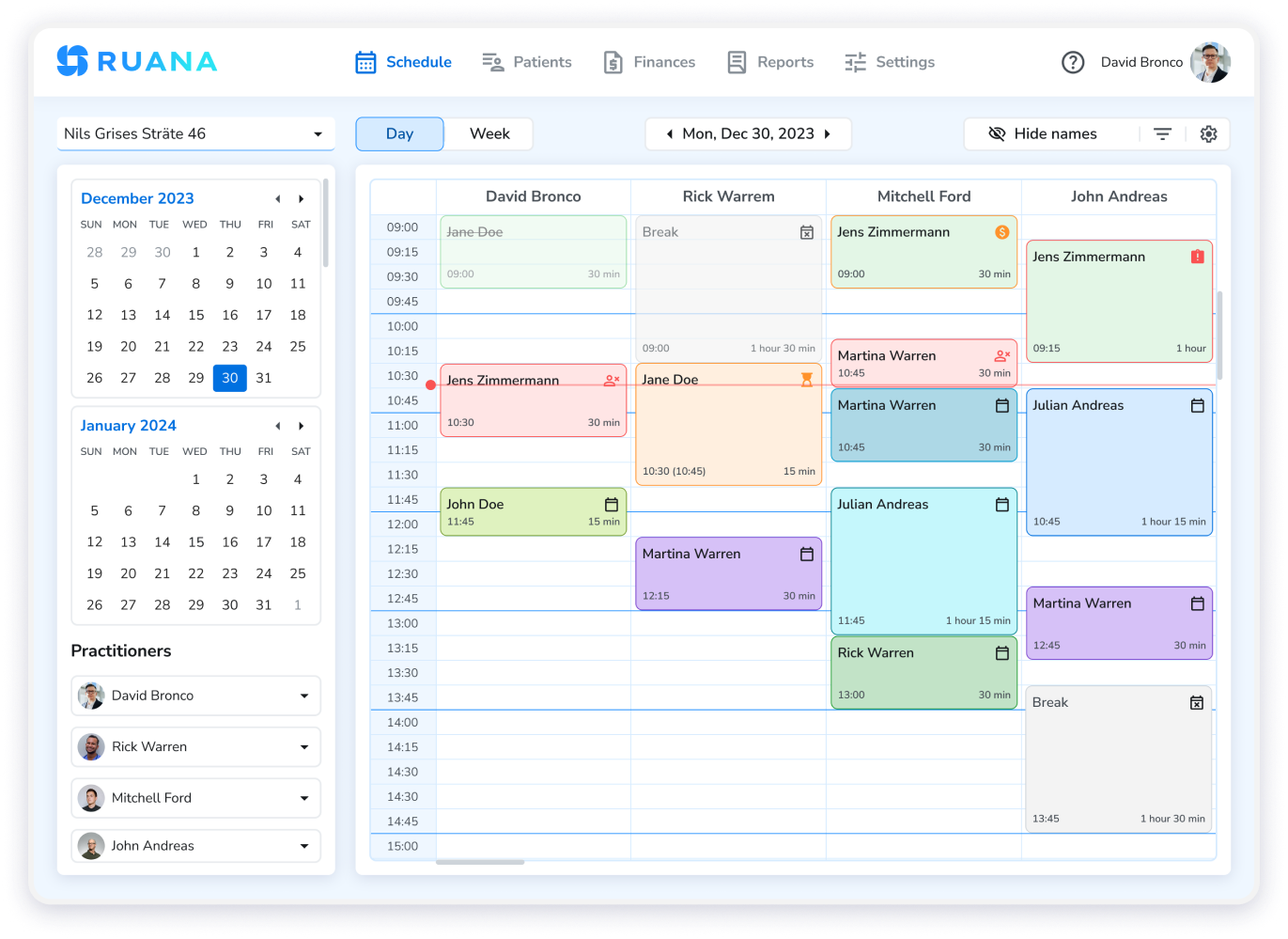
Managing scheduling, documentation, reminders, and billing becomes significantly easier when everything runs in one place. Ruana is built specifically for health and wellness practitioners — with 24/7 online booking, automated SMS and email reminders, SOAP notes, paperless intake forms, and invoicing in a single platform designed to support HIPAA requirements.
Try Ruana Free for 14 Days — No Credit Card Required