

Solo Massage Therapist: Fill Your Schedule Without the Phone
How Solo Massage Therapists Are Filling Their Schedules Without Lifting the Phone
You’re in the middle of a session — hands working through a client’s knotted trapezius, focus sharp, rhythm established — and your phone rings. You ignore it. It rings again. The voicemail notification lights up. By the time you finish and check your messages, you’ve missed two booking inquiries, both of which went silent before you called back.
This is the solo massage therapist’s scheduling paradox: the better you are at your job — the more present and focused during sessions — the worse you are at answering the phone. And in a profession where your revenue depends entirely on a full schedule, every missed call is a missed appointment.
The good news is that this is a solved problem. Solo massage therapists across the US are now running full schedules without playing phone tag, without a front desk, and without interrupting a single session to take a booking. This guide walks through exactly how they do it — and what systems and tools make it possible.
Table of Contents
- The Real Cost of Phone-Based Scheduling
- The Foundation: 24/7 Online Booking That Converts
- Automated Reminders: Your Best Defense Against No-Shows
- Paperless Intake Forms: Eliminate the Clipboard
- SOAP Notes Without the Admin Pile-Up
- Invoicing for Solo Practices: Simple and Professional
- Putting It Together: The Solo Therapist’s Complete System
- A Note on HIPAA for Solo Massage Therapists
- Example: What a Fully Automated Week Looks Like
- Frequently Asked Questions
The Real Cost of Phone-Based Scheduling
Before we get into solutions, it’s worth understanding what phone-based scheduling actually costs a solo massage therapist — because the number is larger than most practitioners realize.
The direct costs are obvious: missed calls mean missed bookings. However, the indirect costs are equally significant. Phone scheduling requires your active attention at the exact moments when you should be focused on client care. It creates a back-and-forth for scheduling that wastes both your time and the client’s. It limits when clients can book to your available hours — which rarely align with when clients actually want to book.
“I was spending 45 minutes a day returning booking calls. That’s nearly four hours a week — the equivalent of three billable massage sessions — just playing phone tag.”
Furthermore, phone-based scheduling doesn’t scale. If your goal is to grow from 20 sessions a week to 30, the phone-based approach creates more bottlenecks, not fewer. The practices that grow smoothly are the ones that replace manual scheduling processes with systems that run without them.
The Foundation: 24/7 Online Booking That Converts
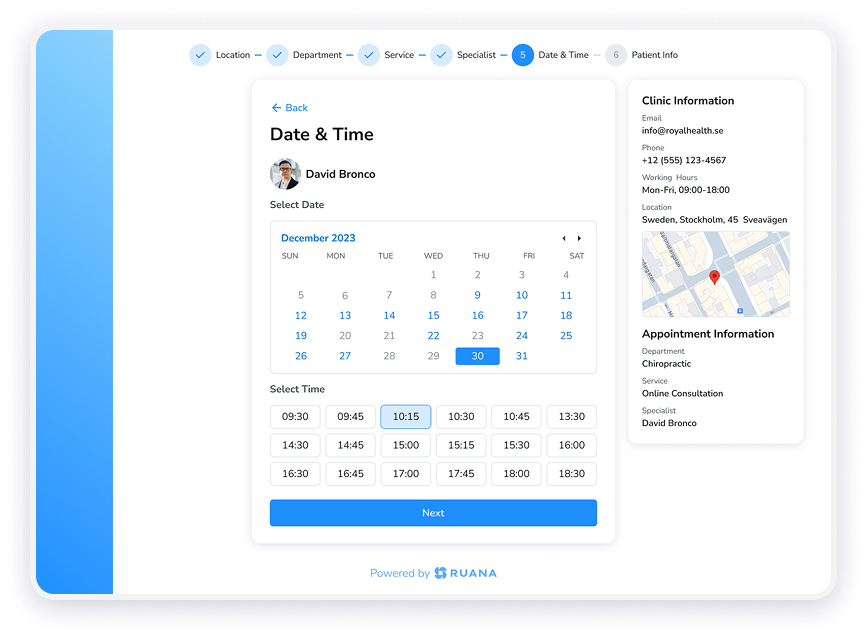
Online booking is the cornerstone of the phone-free solo practice. When clients can self-schedule at any hour — from their phone, during their lunch break, or at 11pm while watching TV — you capture bookings that would otherwise be lost.
However, not all online booking systems convert equally. The single most important factor — and the one most comparison articles skip — is whether clients can book without creating an account.
Why Account Creation Kills Conversions
Many booking platforms require a new client to create a username and password before completing their first booking. This seems like a minor step. In practice, it’s a significant conversion barrier. Research across e-commerce and service booking consistently shows that mandatory account creation reduces completion rates — sometimes dramatically.
For a solo massage therapist operating without a receptionist to follow up on incomplete bookings, a client who abandons the booking flow partway through is simply lost. There’s no one to call them back. The friction of account creation, therefore, directly reduces your schedule fill rate.
When evaluating booking software, ask this question directly: Can a first-time client book their first appointment without creating a login? If the answer is no, factor that conversion loss into your decision.
What a High-Converting Booking Flow Looks Like
A well-designed booking system for a solo massage therapist includes:
- Real-time availability: Your calendar shows exactly when you’re free — no manual updates, no risk of double-booking.
- Service selection: Clients choose their service type (Swedish, deep tissue, sports massage, etc.) and session length in a single clean flow.
- Appointment requests: For new clients or complex scheduling needs, some therapists prefer to approve bookings before they’re confirmed. Good software supports both auto-confirm and approval-required modes.
- Booking link portability: Your booking link should live on your website, in your email signature, on your Instagram bio, and in your Google Business Profile.
Practical tip: Adding your booking link to your Google Business Profile is one of the highest-ROI moves a solo massage therapist can make. Clients searching for massage in your area can book directly from the search results page.
Automated Reminders: Your Best Defense Against No-Shows
A full schedule on paper means nothing if clients don’t show up. No-shows are one of the most significant revenue problems for solo massage therapists — and they’re almost entirely preventable with the right reminder system.
The data on this is consistent: automated reminders, particularly SMS, are the most effective tool for reducing missed appointments. Understanding the difference between SMS and email reminders helps you deploy them strategically.
SMS Reminders: The High-Impact Channel
SMS open rates run at approximately 98%, with most messages read within minutes of receipt. For appointment reminders, this is unmatched. A text message sent the day before — or the morning of — an appointment is almost certainly going to be seen.
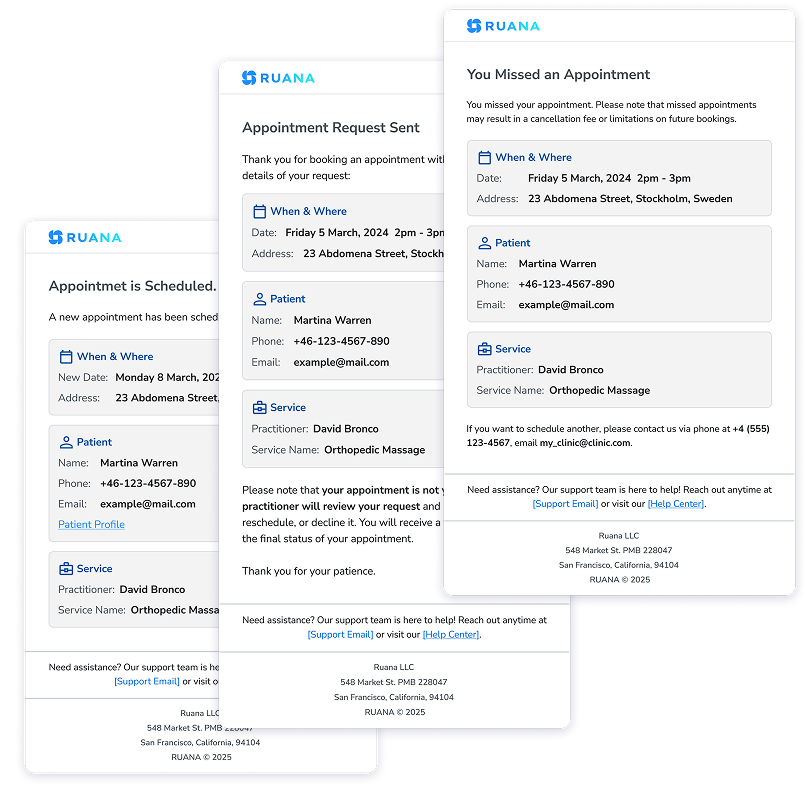
SMS reminders also enable clients to respond directly — confirming, canceling, or rescheduling without a phone call to you. This means your schedule self-manages to a significant degree. Cancellations come in early enough for you to fill the slot. No-shows drop because clients who forgot are reminded before it’s too late.
Email Reminders: The Reliable Baseline
Email reminders are standard on most platforms and should be considered the baseline layer of your reminder strategy. Open rates are lower than SMS — typically 20–30% — but email provides a written record that clients can reference for appointment details, address, and instructions.
Together, SMS and email reminders create overlapping coverage. Clients who miss the text see the email. Clients who skim the email read the text. The combination consistently outperforms either channel alone.
Check before you buy: Many platforms advertise “automated reminders” but deliver only email. SMS reminders are often a paid add-on or restricted to higher-tier plans. If reducing no-shows is a priority — and it should be — confirm SMS availability and pricing before signing up.
Paperless Intake Forms: Eliminate the Clipboard
If you’re still handing clients a clipboard in your waiting room, you’re creating unnecessary friction for both of you. Paper intake forms have to be filled out before the session starts — which means clients either arrive early or sessions start late. They have to be stored securely. They’re difficult to search or reference. And they create real HIPAA exposure if not handled correctly.
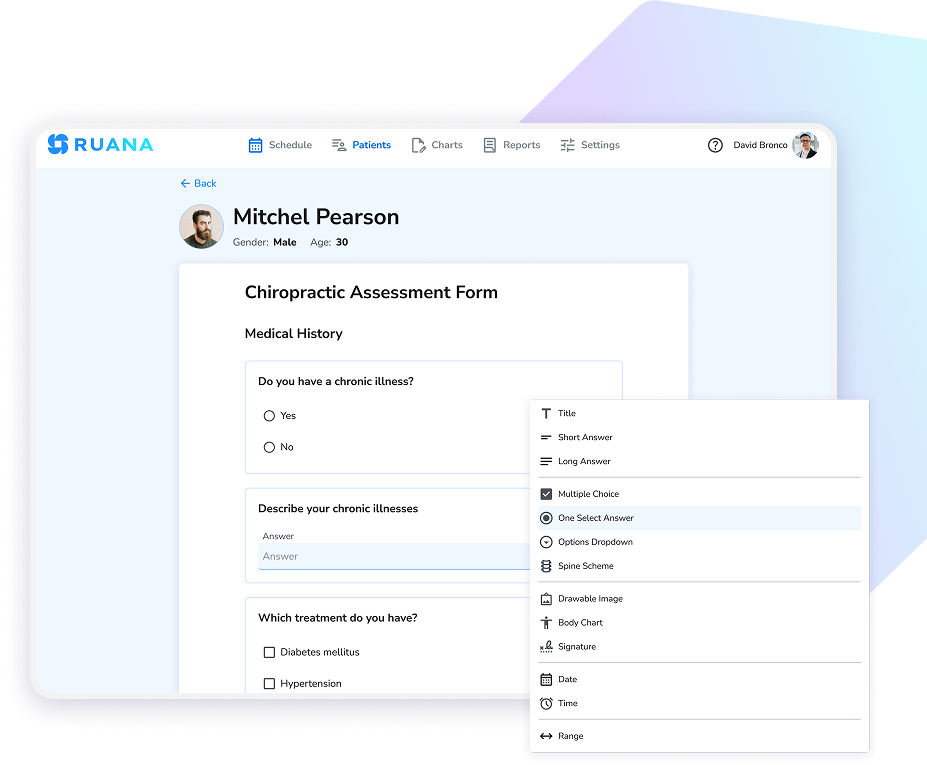
Digital intake forms solve every one of these problems. When a client books an appointment, their intake form is sent automatically. They complete it from their phone or laptop before they arrive. By the time they walk in, their information is already in your system.
What Good Intake Form Software Includes
- Custom form builder: Your intake questions are specific to your practice and modalities. You need to build forms that reflect that, not just use a generic health template.
- Automatic pre-appointment delivery: Forms should go out automatically when a booking is confirmed — without any manual work from you.
- Mobile-optimized completion: Most clients will complete forms on their phone. The experience must be seamless on a small screen.
- Secure storage linked to client records: Completed forms should live in the client’s file — encrypted, organized, and accessible when you need them.
Additionally, for returning clients, good software should make it easy to identify when intake information was last updated and prompt clients to confirm or revise details as needed.
SOAP Notes Without the Admin Pile-Up
SOAP notes are non-negotiable for professional massage practice. They protect you legally, support continuity of care when clients return, and demonstrate the clinical professionalism that distinguishes therapeutic massage from day-spa services.
However, for solo therapists, SOAP note documentation can become a significant time burden — especially if your software makes it cumbersome. The goal is documentation that’s thorough enough to be meaningful and efficient enough that it doesn’t add 20 minutes to every session.
When evaluating SOAP note features in practice management software, look for:
- Structured templates: A good template guides you through documentation without requiring you to write from scratch every time.
- Session history: Notes should link to previous sessions so you can see a client’s treatment arc without hunting through separate files.
- Treatment plan integration: For clients with ongoing treatment plans, notes should reference and update plan progress.
- Custom templates for your modalities: Deep tissue documentation differs from lymphatic drainage documentation. Your templates should reflect your actual work.
A massage therapist seeing a client weekly for chronic lower back pain uses a structured SOAP note template that takes approximately 5 minutes to complete after each session. Over 12 weeks, this builds a detailed treatment history that the therapist references at each appointment — adjusting pressure, technique, and focus areas based on documented progress. When the client asks whether the treatment is working, the therapist can point to specific documented improvements in ROM and reported pain levels.
Invoicing for Solo Practices: Simple and Professional
Billing is an area where solo massage therapists often tolerate more friction than necessary. Many still bill informally — cash at the end of sessions, handwritten receipts, manual tracking of who owes what. This approach works until it doesn’t: until tax season, until a client disputes a charge, until you realize you haven’t tracked unpaid balances and you can’t reconstruct what happened.
Practice management software should make invoicing simple and automatic. The core requirements for a solo therapist are:
- Invoices created automatically at the time of the appointment
- Professional invoice format that reflects your practice brand
- Clear tracking of paid and unpaid balances
- Financial reports by service type and time period
- Downloadable data for tax preparation
For solo therapists who offer session packages or memberships, software should also track package usage so you always know how many sessions a client has remaining — without maintaining a separate spreadsheet.
Putting It Together: The Solo Therapist’s Complete System
The transformation from phone-dependent to phone-free doesn’t happen overnight, but it follows a clear sequence. Here’s the step-by-step setup that solo massage therapists use to build a self-managing schedule.
Set Up Your Online Booking Page
Configure your services, session lengths, and availability in your practice management software. Publish your booking link. Add it to your website homepage, Instagram bio, Google Business Profile, and email signature. From this point forward, clients can book 24/7 without calling you.
Enable Automated Reminders
Turn on both email and SMS reminders. Configure them to go out at the intervals that work best for your practice — typically 48 hours before and again on the morning of the appointment. This is a set-it-and-forget-it step that pays dividends every week.
Build and Activate Your Digital Intake Form
Create your intake form using the software’s form builder — health history, contraindications, treatment preferences, consent. Set it to send automatically when a new client books. New client onboarding now happens without any action from you.
Configure Your SOAP Note Templates
Set up templates for your primary massage modalities. Keep them focused on the information you actually use. A good template should be completable in under 5 minutes post-session.
Activate Invoicing
Configure your services with pricing. Set invoices to generate automatically at appointment completion. Review your financial dashboard weekly — this replaces the manual spreadsheet most solo therapists rely on.
Time investment: Most solo massage therapists complete this setup in under two hours. After that, the system runs without ongoing attention. The return on that two-hour investment — in time, in missed bookings recovered, in no-shows reduced — is immediate and cumulative.
A Note on HIPAA for Solo Massage Therapists
Solo practice doesn’t exempt you from HIPAA. If you collect client health information — and you do, through intake forms — that information is protected health information (PHI) under HIPAA. Your obligation to protect it is the same whether you have one client or one hundred.
The practical implications for software selection are:
- Choose platforms designed to support HIPAA requirements with enterprise-grade encryption
- Confirm that client data is encrypted both in transit and at rest
- Ask about access controls — particularly if you ever share a device with other users
- Understand where your data is hosted and on what infrastructure
Reputable practice management software will be transparent about its security posture. Be cautious of any platform that can’t clearly explain how it handles PHI.
Example: What a Fully Automated Week Looks Like
Monday morning: You start the week with 22 appointments already scheduled — all booked through your online booking link over the weekend while you were offline. Three new clients completed digital intake forms before their first appointments. Your automated SMS reminders have already gone out to Tuesday’s clients. You haven’t touched your phone for scheduling purposes since Friday.
During the week: Between sessions, you spend 5–8 minutes completing SOAP notes. Reminders go out automatically to each day’s clients. Two clients reschedule via the cancellation link in their reminder — both slots fill within hours through your online booking page. You receive no scheduling phone calls.
Friday afternoon: You review your financial dashboard. 22 invoices generated automatically. You check unpaid balances, download your weekly revenue summary, and close out the week. Total admin time for the week: approximately 45 minutes, almost entirely on clinical documentation.
This is not hypothetical. This is what the system looks like when it’s working. The phone still exists — it’s just no longer your scheduling department.
Frequently Asked Questions
How do solo massage therapists manage bookings without a receptionist?
Solo massage therapists can replace receptionist functions with 24/7 online booking software. Clients self-schedule from any device, automated reminders go out without manual work, and digital intake forms are sent automatically before appointments. This eliminates phone interruptions during sessions and removes the need for a front desk entirely.
What is the best way to reduce no-shows as a solo massage therapist?
The most effective approach is combining automated SMS and email reminders. SMS reminders have open rates of approximately 98% and are typically read within minutes of receipt. Pairing SMS with email reminders ensures clients receive appointment confirmation through multiple channels, significantly reducing missed appointments without any manual work from you.
Do solo massage therapists need HIPAA-compliant software?
Yes. Solo massage therapists who collect client health information through intake forms or SOAP notes are handling protected health information (PHI) under HIPAA. Even without front desk staff, your software should be designed to support HIPAA requirements with enterprise-grade encryption and appropriate access controls.
How much does practice management software cost for a solo massage therapist?
Solo-tier plans for massage practice management software typically range from $40 to $55 per month. At that price point you should expect online booking, email reminders, digital intake forms, SOAP notes, and basic invoicing. SMS reminders are sometimes offered as an additional paid feature. Most platforms offer a free trial — look for at least 14 days with no credit card required.
Can massage therapy software handle SOAP notes and intake forms together?
Yes. The best massage therapy platforms integrate SOAP notes and digital intake forms in the same client record. Intake form data flows directly into the client’s file, and SOAP notes are linked to each session — so your entire treatment history is organized in one place without any manual data transfer between systems.
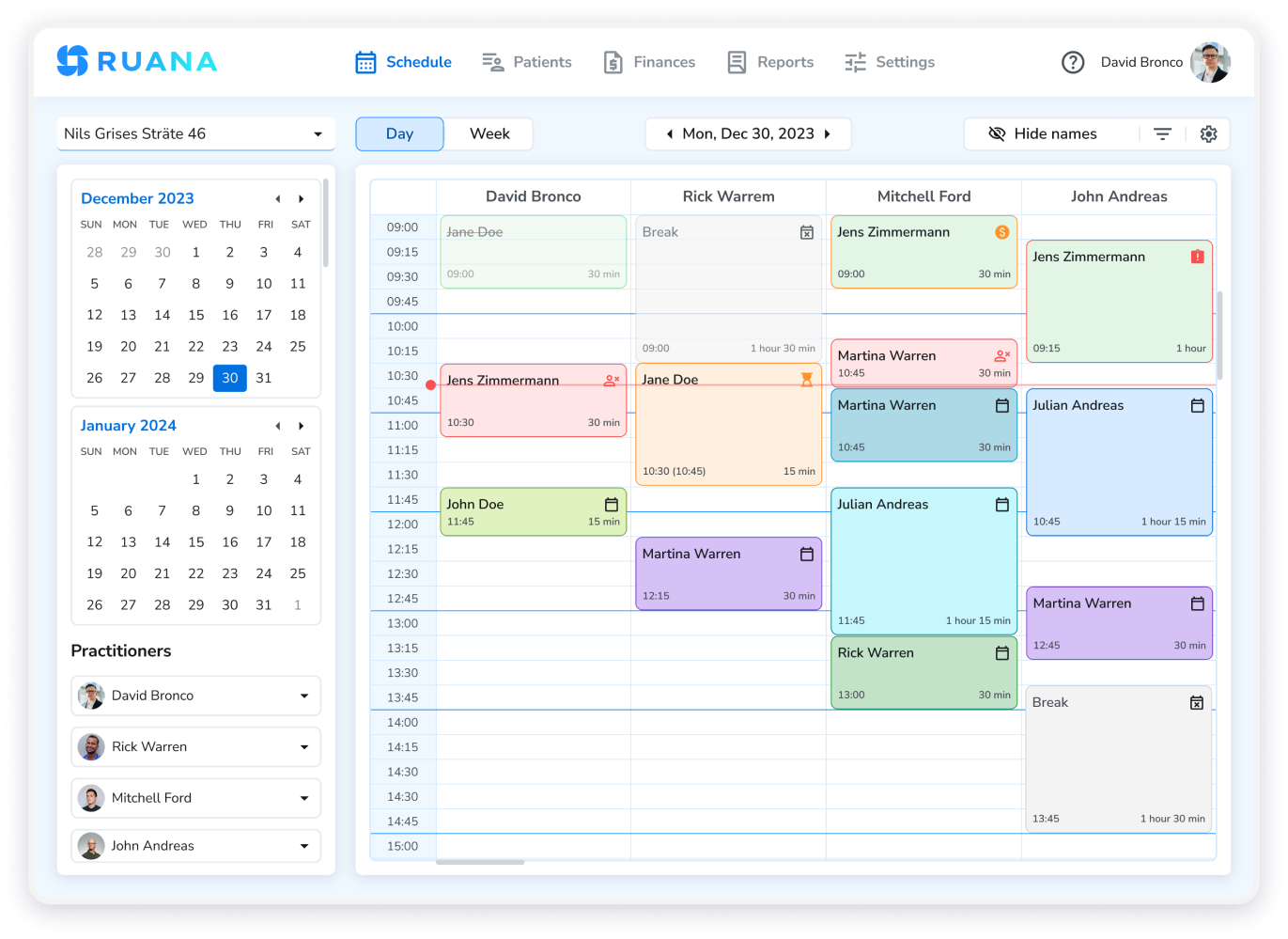
Running a solo massage practice without a receptionist doesn’t mean doing everything manually. Ruana gives solo massage therapists 24/7 online booking, automated SMS and email reminders, paperless intake forms, SOAP notes, and invoicing — in one platform designed to support HIPAA requirements. Set it up once. Let it run.
Try Ruana Free for 14 Days — No Credit Card Required