

Best Software for Chiropractic Cash Practices 2026
Best Software for Chiropractic Cash Practices in 2026: What to Look For
Running a chiropractic cash practice is a fundamentally different business than running an insurance-based clinic. Your revenue model is simpler, your overhead is lower, and your administrative burden should be too — but only if your software is built for the way you actually operate.
The problem is that most chiropractic practice management software is designed around insurance billing workflows. Clearinghouse integrations, ERA processing, prior authorizations, denial management — features you don’t need, bundled into platforms that charge you for them anyway. Cash practices that use insurance-first software end up paying for complexity they never use while missing features that actually matter for direct-pay operations.
This guide is for chiropractors who have gone cash-pay — or are considering it — and want to understand exactly what software features matter, what doesn’t, and what to look for before signing up for a platform. Whether you’re a solo chiropractor or managing a multi-doctor clinic, the framework here applies.
Table of Contents
- Cash Practice vs. Insurance Practice: Why Software Needs Differ
- Superbills: The Most Important Feature Most Guides Skip
- SOAP Notes & Clinical Documentation
- Online Booking for Chiropractic Cash Practices
- Appointment Reminders: SMS & Email
- Digital Intake Forms & Paperless Onboarding
- Invoicing & Billing for Cash Practices
- Packages, Memberships & Care Plans
- Financial Reporting & Practice Analytics
- HIPAA Compliance for Cash Chiropractic Practices
- The Cash Practice Software Checklist
- Frequently Asked Questions
Cash Practice vs. Insurance Practice: Why Software Needs Differ
Insurance-based chiropractic software is architected around one core function: submitting claims to payers and reconciling what comes back. Everything else — scheduling, documentation, patient records — is built around that billing infrastructure. For cash practices, this creates a fundamental mismatch.
When you operate on a direct-pay model, your billing workflow looks completely different. Patients pay you directly at or before the time of service. You don’t submit claims. You don’t chase reimbursements. You don’t manage EOBs or denials. Your financial operations are dramatically simpler — and your software should reflect that.
However, “simpler billing” doesn’t mean “no billing features.” Cash practices still need professional invoicing, CPT and ICD-10 code support for documentation purposes, superbill generation for patients who want to self-submit to insurance or use HSA/FSA funds, and financial reporting that gives you a clear picture of practice revenue. The difference is that these features should serve your direct-pay workflow — not an insurance claims workflow.
The core principle: Cash practice software should be lean on insurance infrastructure and rich on patient experience, documentation quality, and direct-pay billing tools.
Superbills: The Most Important Feature Most Guides Skip
If there’s one billing feature that separates truly cash-practice-ready software from everything else, it’s superbill generation — and it’s the feature most comparison guides fail to mention.
What Is a Superbill?
A superbill is a detailed receipt that contains all the information a patient needs to submit a claim to their insurance company or seek reimbursement from their HSA or FSA account directly. It typically includes:
- Provider name, NPI number, and practice address
- Patient information and date of service
- CPT codes for each service rendered
- ICD-10 diagnosis codes
- Fee charged for each service
- Total amount paid
In a cash practice, you don’t submit this to insurance — your patient does. However, many patients choose cash practices specifically because they want more control over their care, and they still want the ability to seek partial reimbursement from their out-of-network benefits or use pre-tax HSA/FSA funds. Without a superbill, you’re making that harder for them than it needs to be.
Why this matters for your practice: Offering superbills makes your cash practice more accessible to patients with out-of-network benefits or HSA/FSA accounts. It removes a friction point that might otherwise cause patients to choose an in-network provider instead.
What to Look For in Superbill Software
- Automatic superbill generation tied to each completed visit
- CPT code support with the codes relevant to chiropractic care
- ICD-10 diagnosis code integration
- Professional formatting that meets payer standards
- Easy delivery to patients via email or patient portal

SOAP Notes & Clinical Documentation
Clinical documentation is the backbone of any chiropractic practice — cash or insurance. However, the documentation needs of cash practices have some specific characteristics worth understanding when evaluating software.
In an insurance-based practice, SOAP notes are often driven by billing requirements — documentation must support the CPT codes billed. In a cash practice, documentation still matters enormously for clinical continuity, legal protection, and professional standards, but it can be structured around clinical utility rather than billing justification.
Basic vs. Advanced SOAP Notes
Most chiropractic software offers SOAP note templates at some level. The meaningful distinction is between basic structured notes and advanced systems that include automatic note generation.
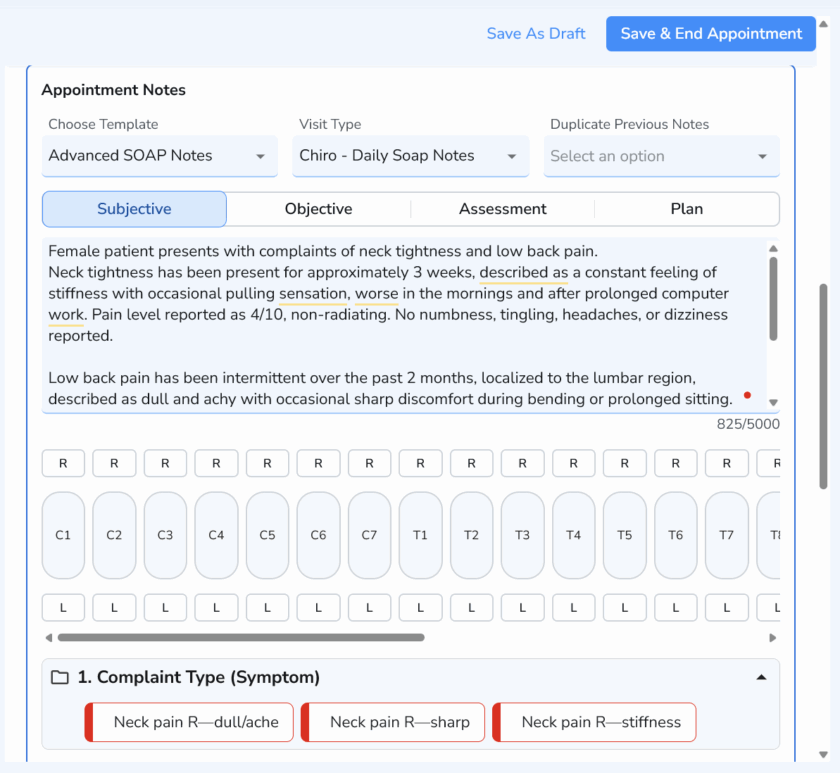
Advanced SOAP note systems allow chiropractors to pre-program buttons that insert full sentences, exam findings, or adjustment summaries with a single click. For a busy cash practice seeing 30–50 patients per day, this difference in documentation speed is significant. A note that takes 8 minutes with a basic template might take 2 minutes with a well-configured advanced system — which across a full day represents meaningful time savings.
What to Evaluate in Chiropractic SOAP Note Software
- Template customization: Can you build templates that match your specific adjustment techniques and documentation language?
- Treatment plan integration: Are SOAP notes linked to the patient’s care plan so you can track progress over time?
- Charting templates: Does the system offer pre-built chiropractic-specific templates as a starting point?
- Access across devices: Can you complete notes on a tablet or laptop at the table without returning to a desktop?
- Advanced auto-notes: Is there a macro or button system that speeds up repetitive documentation?
Online Booking for Chiropractic Cash Practices
Cash practices tend to attract a patient demographic that values convenience and autonomy — exactly the kind of patients who expect to book appointments online rather than calling during business hours. Your booking system should match that expectation.
The non-negotiables for chiropractic online booking in 2026:
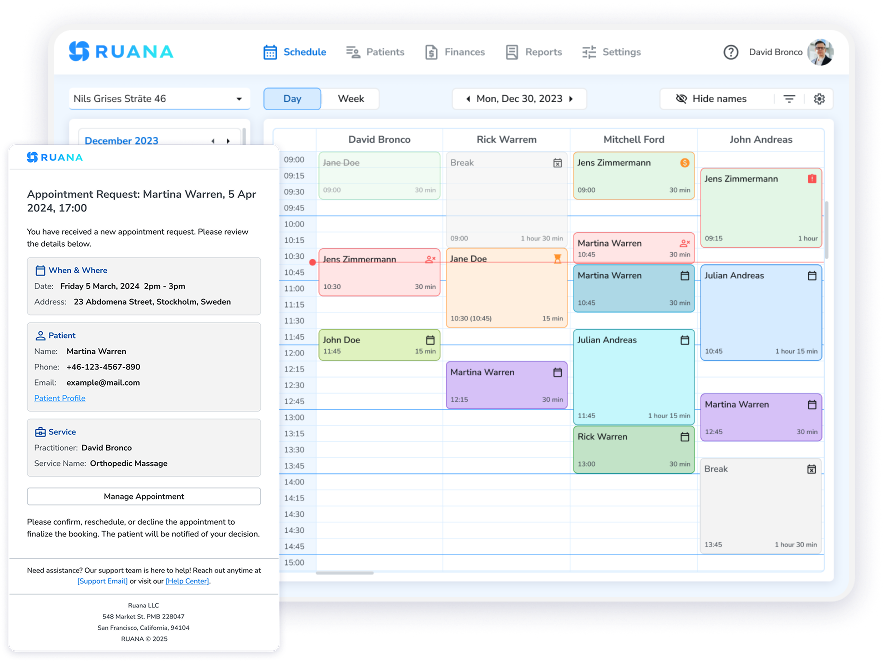
- No patient account required: Requiring new patients to create a login before booking their first appointment creates unnecessary friction. This is a well-documented conversion barrier across service industries. Look for software where new patients can book without creating a username and password.
- 24/7 availability: A significant percentage of chiropractic appointments are booked outside business hours — evenings and weekends when patients feel the back pain that motivated them to seek care. Your booking page needs to work at midnight on a Saturday.
- Appointment request mode: For new patient consultations or complex cases, some chiropractors prefer to approve bookings before they’re confirmed. Look for software that supports both auto-confirm and request-approval modes.
- Multi-practitioner support: For multi-doctor practices, patients should be able to select their preferred chiropractor and see that provider’s specific availability.
Appointment Reminders: SMS & Email
No-shows are expensive in any practice, but they hit cash practices particularly hard. Unlike insurance-based practices where a portion of revenue is captured regardless through billing cycles, cash practices only get paid when patients show up. A missed appointment is a missed payment — full stop.
Automated reminders are the single most effective tool for reducing no-shows, and the difference between SMS and email is worth understanding clearly.
SMS Reminders
SMS open rates run at approximately 98%, with most messages read within minutes of receipt. For chiropractic appointment reminders, this means your reminder is almost certainly seen — unlike email, which competes with dozens of other messages in a crowded inbox. For cash practices in particular, where every appointment represents direct revenue, the ROI on SMS reminders is straightforward.
Email Reminders
Email reminders serve as a reliable secondary layer. Open rates are lower than SMS — typically 20–30% — but email provides a written confirmation that patients can reference for appointment time, location, and any pre-visit instructions. The combination of SMS and email creates overlapping coverage that consistently outperforms either channel alone.
Check before signing up: SMS reminders are frequently a paid add-on or restricted to higher plan tiers. If no-show reduction is a priority — and for cash practices it should be — confirm SMS is included or available before committing to a platform.
Digital Intake Forms & Paperless Onboarding
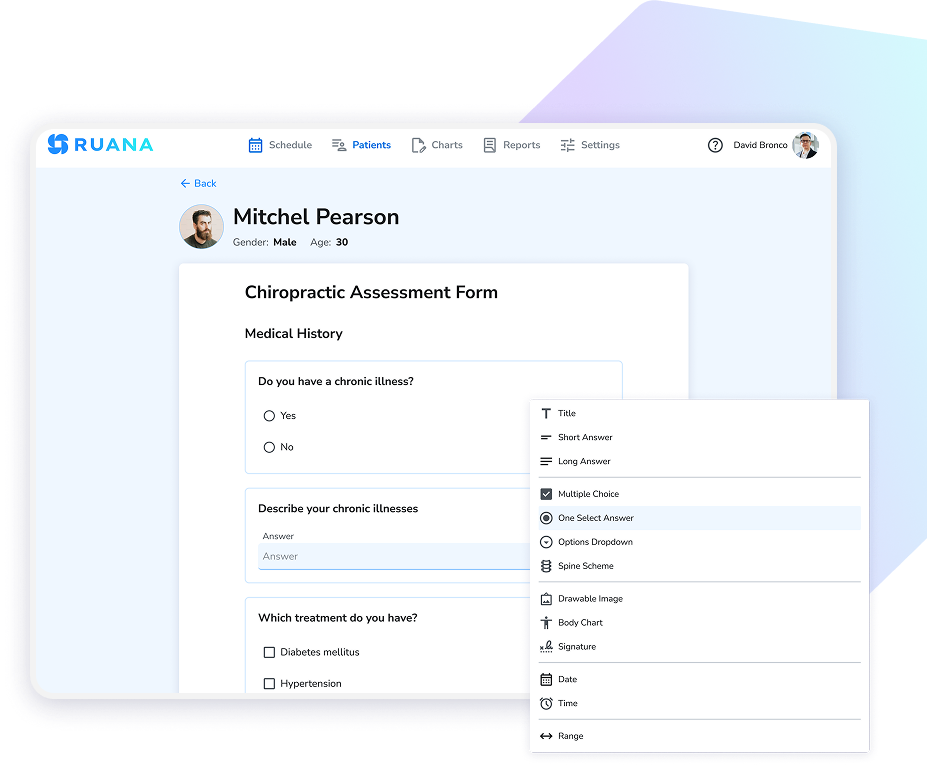
New patient intake is an area where cash practices often invest significant front-desk time — time that digital intake forms can eliminate almost entirely. When a new patient books, their intake form should go out automatically. By the time they arrive for their first appointment, their health history, consent forms, and relevant information are already in your system.
For chiropractic cash practices specifically, digital intake forms serve an additional purpose: they create a documented clinical record from the very first patient interaction, which matters for legal protection and continuity of care.
Key features to evaluate:
- Custom form builder: Chiropractic intake needs differ from other practices. You need to capture specific information about spinal history, previous injuries, current medications, and consent for treatment. Look for software that lets you build forms specific to your clinical needs.
- Automatic delivery: Forms should send the moment a booking is confirmed — no manual triggering required.
- Mobile-optimized: Most patients will complete forms on their phone. The experience needs to be seamless on a small screen.
- Secure storage: Completed forms should be encrypted and linked directly to the patient’s record.
Invoicing & Billing for Cash Practices
Cash practice billing is straightforward compared to insurance — but “straightforward” still requires proper infrastructure. Professional invoicing, accurate record-keeping, and clean financial reporting are not optional for a practice that takes its business operations seriously.
What Cash Practice Invoicing Should Include
- Automatic invoice generation tied to completed appointments
- CPT and ICD-10 code support for documentation and superbill purposes
- Superbill generation for patients seeking out-of-network reimbursement
- Tracking of paid and outstanding balances
- Professional invoice formatting with practice branding
- Revenue tracking by service type, provider, and time period
- Downloadable financial reports for tax preparation
CPT codes in cash practices: Even without insurance billing, CPT codes serve important purposes in cash chiropractic practices — they appear on superbills, support documentation standards, and provide consistent service categorization for financial reporting. Look for software that supports CPT code entry in invoices even if you’re not submitting claims.
Packages, Memberships & Care Plans
One of the most powerful revenue tools available to chiropractic cash practices — and one that insurance-based practices can’t easily offer — is the care package or wellness membership. When patients pay in advance for a series of adjustments or commit to a monthly wellness plan, you gain revenue predictability and they gain financial incentive for consistent care.
However, packages and memberships only work at scale if your software tracks them properly. Manual spreadsheet tracking of which patients have remaining sessions is error-prone and time-consuming. Look for software that:
- Tracks session credits per patient automatically
- Shows remaining balance at the time of each visit
- Supports multiple package types with different rules and expiration dates
- Handles recurring membership billing cycles
- Integrates package usage into financial reporting
For multi-doctor practices, package tracking becomes even more important — patients may see different providers across visits, and the package credit system needs to work consistently regardless of which chiropractor sees them.
Financial Reporting & Practice Analytics
One of the genuine advantages of running a cash practice is financial clarity. You know exactly how much revenue you’re generating because it all flows directly from patients to you — no insurance lag, no partial payments, no write-offs against contracted rates. Your software should help you see that clarity in real time.
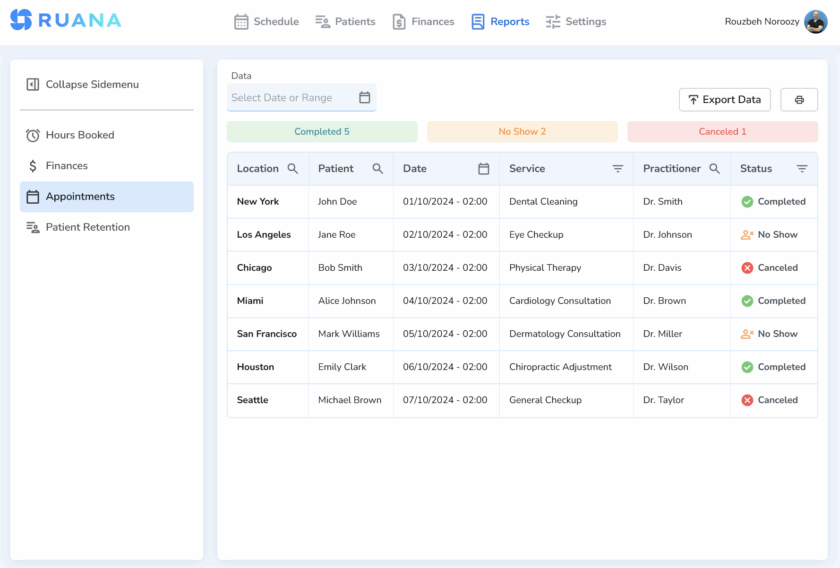
Look for reporting tools that surface:
- Revenue trends: Weekly, monthly, and annual revenue with period-over-period comparison
- Service-level breakdown: Which adjustment types and services generate the most revenue
- Provider performance: For multi-doctor practices, revenue and visit volume by chiropractor
- Patient visit frequency: How often patients are returning, and which patients are overdue
- No-show and cancellation rates: Tracked over time so you can measure the impact of reminder strategies
- Outstanding balances: Any unpaid invoices across your patient base
HIPAA Compliance for Cash Chiropractic Practices
A common misconception among cash-pay chiropractors is that opting out of insurance billing also reduces HIPAA obligations. It does not. Any practice that collects, stores, or transmits protected health information (PHI) — which includes intake forms, SOAP notes, and patient records — is subject to HIPAA regardless of payment model.
When evaluating software, look for:
- Enterprise-grade encryption for data in transit and at rest
- Role-based access controls for multi-doctor practices
- Secure cloud hosting on reputable infrastructure
- Automatic data backups
- Transparent privacy and security documentation from the vendor
Important: Be cautious of any platform that makes absolute claims about being “fully HIPAA compliant.” HIPAA compliance is a shared responsibility — your software should be designed to support HIPAA requirements, but your practice policies and procedures are equally part of the equation. A vendor that understands this distinction is a vendor that takes security seriously.
The Cash Practice Software Checklist
Before committing to any platform, run through this checklist. These are the questions that separate genuinely cash-practice-ready software from insurance-centric platforms with a cash-pay marketing layer.
| Feature Category | What to Confirm |
|---|---|
| Superbills | Does it generate superbills with CPT codes, ICD-10 codes, and provider NPI? Are they auto-generated per visit? |
| SOAP Notes | Are SOAP notes included in your plan tier? Is there an advanced/auto-note system? Can you build custom templates? |
| Online Booking | Can patients book without creating an account? Is it available 24/7? Does it support multi-provider scheduling? |
| Reminders | Are SMS reminders available? At what cost? Are email reminders automatic and included in the base plan? |
| Intake Forms | Can you build custom forms? Do they send automatically on booking? Are they mobile-optimized? |
| Invoicing | Does it support CPT codes? Can it track paid and unpaid balances? Is invoicing automatic? |
| Packages & Memberships | Does it track session credits automatically? Does it support recurring membership billing? |
| Reporting | Can you see revenue by service type and provider? Are reports exportable for tax purposes? |
| HIPAA | Is data encrypted in transit and at rest? Is the platform designed to support HIPAA requirements? |
| Pricing & Trial | Is pricing transparent per provider? Is there a free trial with no credit card required? |
Frequently Asked Questions
What software do chiropractic cash practices need?
Chiropractic cash practices need software that handles online booking, automated reminders, SOAP notes with CPT code support, superbill generation, invoicing, digital intake forms, and financial reporting — without requiring insurance billing modules that add cost and complexity. The best platforms are designed for direct-pay workflows from the ground up.
Do chiropractic cash practices need to generate superbills?
Yes, in most cases. Even cash-pay chiropractors commonly generate superbills for patients who want to seek reimbursement from their out-of-network benefits or use HSA/FSA funds. A superbill includes CPT codes, ICD-10 diagnosis codes, provider information, and service details — giving patients everything they need to submit a claim themselves without you submitting it on their behalf.
How is chiropractic cash practice software different from insurance-based software?
Insurance-based chiropractic software is built around clearinghouse integrations, claim submission, ERA processing, and denial management. Cash practice software focuses instead on patient scheduling, direct documentation, superbill generation, direct invoicing, and financial reporting — without the overhead of insurance billing infrastructure. Cash practices pay less and operate more efficiently when they use software built for their model.
How much does chiropractic practice management software cost?
Solo chiropractic practice management software typically costs between $40 and $70 per month at the entry level. Multi-doctor practices pay more based on the number of providers, typically $15–$25 per additional chiropractor per month. Look for transparent per-seat pricing rather than opaque flat fees that don’t scale cleanly as your practice grows.
Is HIPAA compliance required for chiropractic cash practices?
Yes. Chiropractic cash practices handle protected health information through intake forms, SOAP notes, and patient records. HIPAA applies regardless of whether you bill insurance. Your software should be designed to support HIPAA requirements with enterprise-grade encryption, appropriate access controls, and secure cloud hosting.
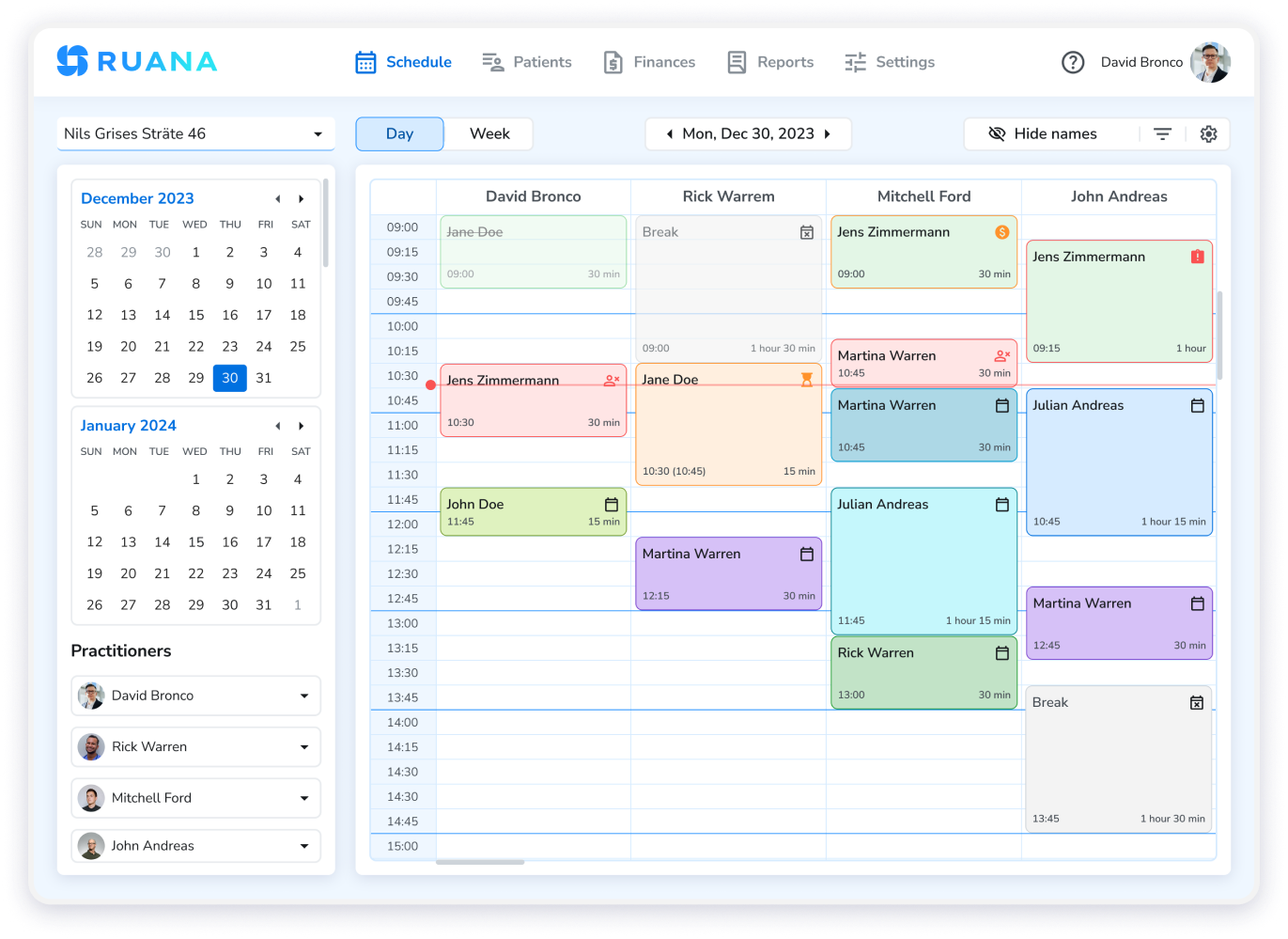
Ruana is built for health and wellness practitioners who want a complete practice management platform without the insurance billing overhead. For chiropractic cash practices, that means 24/7 online booking, automated SMS and email reminders, advanced SOAP notes, superbill generation, CPT and ICD-10 support, digital intake forms, packages and memberships, and financial reporting — all in one platform designed to support HIPAA requirements. Solo or multi-doctor, the tools are the same.
Try Ruana Free for 14 Days — No Credit Card Required